Close Menu
  • Automotive
  • Business
    • Crypto
  • Education
  • Fashion
  • Finance
  • Health
    • CBD
  • Home Improvement
  • Law \ Legal
  • News
    • Entertainment
    • Sports
  • Shopping
  • Technology
  • Travel
Facebook X (Twitter) Instagram
AB News Fire – Breaking News and UpdatesAB News Fire – Breaking News and Updates
  • Home
  • Write To Us
  • Automotive
  • Business
    • Crypto
  • Education
  • Fashion
  • Finance
  • Health
    • CBD
  • Home Improvement
  • Law \ Legal
  • News
    • Entertainment
    • Sports
  • Shopping
  • Technology
  • Travel
Home»Automotive»Proton X50 now available with ATLAS OS by ACO Tech – here’s a guide on how to perform the OTA update
Automotive

Proton X50 now available with ATLAS OS by ACO Tech – here’s a guide on how to perform the OTA update

By No Comments2 Mins Read

[ad_1]

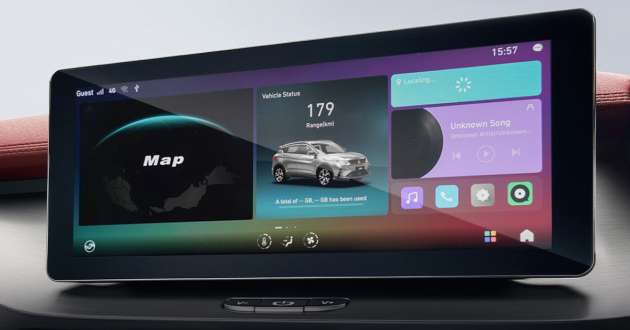
The infotainment system in the Proton X50 can now be updated to the ATLAS (an acronym for ACO Tech Local Automotive Services) operating system, which you can do at home without having to visit a service centre.

According to a recent post on Proton’s Facebook page, the update promises a refined user interface design for personal customization, an improved voice command experience and intelligent alerts, an enhanced navigation experience as well as new experiences with an app marketplace.

There’s also a set of instructions on how to get the over-the-air (OTA) update. Firstly, users with the older Geely Smart Ecosystem (GKUI) operating system will need to enter the “Settings” menu and click on “System.”

Proton X50 ATLAS update process (3)

Proton X50 ATLAS update process (5)

An “Update available” message will be shown if the OTA update is ready for your vehicle, after which you’ll need to click on “GKUI 19” to continue, followed by “Speed first” to begin downloading the new operating system.

Once that’s done, click on “Install” and confirm the process by clicking “Sure” on the pop-up message. While the software is being installed, you’ll be unable to interact with the infotainment system and you’ll want to make sure to keep the engine running in a safe space until the process is completed – this will take approximately 10-15 minutes.

Proton X50 ATLAS update process (7)

Proton X50 ATLAS update process (10)

Once the update is complete, the head unit will restart itself and you can check if you have the latest update by entering “Settings” and clicking on “System.” For Standard and Executive variants of the X50, the software version should read “SW0SXRA0616L5170.00582,” while it’s “SW0SXRA0616H5170.00581” for the Premium and Flagship.

With that, you can now enjoy all the benefits of ATLAS in your X50. If you’re curious about what’s new with the operating system, do check out our video tour where Hafriz Shah takes you through all the features and improvements of ATLAS. Share your experience in the comments below.

GALLERY: Proton X50 with ACO Tech Atlas OS


[ad_2]

Source link

Related Posts

The Rise of Autonomous Driving in Automotive Technology

November 14, 2025

The Future of the Automotive Industry: Innovation, Sustainability, and Market Shifts

August 11, 2024

No new Perodua Bezza in 2023 – only one full model change per year, and that’s the Axia, CEO confirms

January 31, 2023

Comments are closed.

Our Picks

How Tech Is Revolutionizing Remote Work Environments

June 12, 2026

Smart Travel Hacks for Comfortable and Affordable Trips

June 10, 2026

Financial Wellness Programs and Their Benefits

May 22, 2026

The Rise of Personalized Shopping Experiences Online

May 9, 2026
Recent Posts
  • How Tech Is Revolutionizing Remote Work Environments June 12, 2026
  • Smart Travel Hacks for Comfortable and Affordable Trips June 10, 2026
  • Financial Wellness Programs and Their Benefits May 22, 2026
  • The Rise of Personalized Shopping Experiences Online May 9, 2026
  • Fashion Accessories That Complete Every Outfit Perfectly April 12, 2026
Archives
  • June 2026 (2)
  • May 2026 (2)
  • April 2026 (1)
  • March 2026 (1)
  • February 2026 (1)
  • January 2026 (1)
  • December 2025 (1)
  • November 2025 (1)
  • September 2025 (1)
  • August 2025 (1)
  • April 2025 (1)
  • March 2025 (1)
  • February 2025 (1)
  • December 2024 (1)
  • October 2024 (1)
  • August 2024 (1)
  • June 2024 (3)
  • March 2024 (1)
  • January 2024 (1)
  • December 2023 (1)
  • November 2023 (1)
  • September 2023 (2)
  • August 2023 (1)
  • April 2023 (1)
  • January 2023 (17)
  • October 2022 (762)
  • September 2022 (1137)
  • August 2022 (1202)
  • July 2022 (1323)
  • June 2022 (1266)
  • May 2022 (2)
  • September 2021 (1)
Categories
  • Automotive (1,677)
  • Business (597)
  • Casino (10)
  • CBD (10)
  • Crypto (644)
  • Education (15)
  • Entertainment (10)
  • Fashion (114)
  • Finance (72)
  • Health (38)
  • Home Improvement (17)
  • Law \ Legal (259)
  • News (1,457)
  • Pet (1)
  • Shopping (757)
  • Sports (1)
  • Technology (42)
  • Travel (18)
Facebook X (Twitter) Instagram Pinterest
  • Home
  • Write To Us
© 2022- AB News Fire- All Rights Reserved.

Type above and press Enter to search. Press Esc to cancel.